Thursday, March 27, 2014

6 Most Common Password Cracking Methods And Their Countermeasures.

There are number of methods out their used by hackers to hack your account or get your personal information. Today in this post i will share with you guys 6 Most commonly used method to crack password and their countermeasures. You must check out this article to be safe and to prevent your online accounts from  hacking.
Any password can be cracked using Brute-force attack. Brute-force attacks try every possible combinations of numbers, letters and special characters until the right password is match. Brute-force attacks can take very long time depending upon the complexity of the password. The cracking time is determined by the speed of computer and complexity of the password.
Countermeasure: Use long and complex passwords. Try to use combination of upper and lowercase letters along with numbers. Brute-force attack will take hundreds or even thousands of years to crack such complex and long passwords.
Example: Passwords like "iloveu" or "password" can be cracked easily whereas computer will take years to crack passwords like "apr0ki5".
Social engineering is process of manipulating someone to trust you and get information from them. For example, if the hacker was trying to get the password of a co-workers or friends computer, he could call him pretending to be from the IT department and simply ask for his login details. Sometime hackers call the victim pretending to be from bank and ask for their credit cards details. Social Engineering can be used to get someone password, to get bank credentials or any personal information.
Countermeasure: If someone tries to get your personal or bank details ask them few questions. Make sure the person calling you is legit. Never ever give your credit card details on phone.
In keylogging or RATing the hacker sends keylogger or rat to the victim. This allows hacker to monitor every thing victim do on his computer. Every keystroke is logged including passwords. Moreever hacker can even control the victims computer.
Countermeasure: Never login to your bank account from cyber cafe or someone else computer. If its important use on-screen or virtual keyboard while tying the login. Use latest anti-virus software and keep them updated. 
Phishing is the most easiest and popular hacking method used by hackers to get someone account details. In Phishing attack hacker send fake page of real website like facebook, gmail to victim. When someone login through that fake page his details is send to the hacker. This fake pages can be easily created and hosted on free web-hosting sites.
Countermeasure: Phishing attacks are very easy to avoid. The url of this phishing pages are different from the real one. For example URL of phishing page of facebook might look like facbbook.com (As you can see There are two "b"). Always make sure that websites url is correct.
A Rainbow table is a huge pre-computed list of hashes for every possible combination of characters. A password hash is a password that has gone through a mathematical algorithm such as md5 and is transformed into something which is not recognizable. A hash is a one way encryption so once a password is hashed there is no way to get the original string from the hashed string. A very commonly used hashing algorithm to store passwords in website databases is MD5. It is almost similar to dictionary attack, the only difference is, in rainbow tables attack hashed characters are used as passwords whereas in dictionary attack normal characters are used as passwords. 
Example: ‘hello’ in md5 is 5d41402abc4b2a76b9719d911017c592 and zero length string ("") is d41d8cd98f00b204e9800998ecf8427e
Countermeasure: Make sure you choose password that is long and complex. Creating tables for long and complex password takes a very long time and a lot of resources
This seems silly but this can easily help you to get someones password within seconds. If hacker knows you, he can use information he knows about you to guess your password. Hacker can also use combination of Social Engineering and Guessing to acquire your password.
Countermeasure: Don't use your name, surname, phone number or birthdate as your password. Try to avoid creating password that relates to you. Create complex and long password with combination of letters and numbers.

How To Create Android Apps Without Coding.

Hello Everyone today i'm going to tell you "How To Create Android Apps Without Coding". As you all know that Android is one of most used mobile platform in world. Android is free and open source operating system so one easily customize the operating system, makes app and many more that's why android is getting popular day by day. If one has great idea of any app but he does not have any coding knowledge so, what he could do he can't creates his android app? well the answer is no there is always a way. Just follow the procedure can creates your android app free and without any coding. There are a lots of websites available on internet to create android apps without any coding but will tell you about the best ones only :-


AppsGeyser

Apps Geyser is the one of best site for android app making without any coding. Apps Geyser provide you to create many types of apps like Website, Page, Browser, YouTube app ( for you channel ), HTML code, TV, Photo, News, Book, Audio, Wallpaper and Quiz apps etc. In order to make these apps you need to create free account on this website. After this you have to select you app category mentioned above later on you will have to select app name description about application. After all these things you have to click on Create App button. After in few minutes you will be able to download your created app in apk format. You can also further update you app.

Features Of AppsGeyser :-
No Need Of Coding.
No Cost.
Earn money by your apps.
Modify apps at any time.
HTML 5 for extra Features.

I recommend to all of you to use this site for making android app without any coding knowledge. If know another site about app making you can comment below. If you really found his article helpful then you Share it. Thanks.

Android Tools for free.

Android Tools 


Android is slowly becoming a popular target for hackers and other cyber-criminals world wide.Hackers are now exploiting the security vulnerabilities found in Android with specific softwares that can be modified to make any app act as a Malware.


TOOLS ARE :-
                                                             

Hack Code:
The hacker's Toolbox is an application for penetration tester, Ethical hackers, IT administrator and Cyber security professional to perform different tasks like reconnaissance, scanning performing exploits etc.

DOWNLOAD

AVD Clone: Clone an Android Virtual Device for easy distribution through the Android SDK Manager. You can create an AVD preinstalled with the apps and settings you need, and distribute it to others by having them point their Android SDK Manager to your repository.  Tool made by Security Compass.

 DOWNLOAD


APKInspector : The goal of this project is to aide analysts and reverse engineers to visualize compiled Android packages and their corresponding DEX code. APKInspector provides both analysis functions and graphic features for the users to gain deep insight into the malicious apps.

DOWLOAD

Burp Suite:  It is an integrated platform for performing security testing of web applications. Its various tools work seamlessly together to support the entire testing.

DOWNLOAD

Androguard:   Create your own static analysis tool,; Analysis a bunch of android apps,; Analysis . Open source database of android malware.

DOWNLOAD

Android Framework for Exploitation :
Smartphone Pentest Framework: Rather this tool allows you to assess the security of the smartphones in your environment in the manner you’ve come to expect with modern penetration testing tools.

DOWNLOAD

Android Network Toolkit (ANTI) 

This app is capable of mapping your network, scanning for vulnerable devices or configuration issues. It is for use by the amateur security enthusiast home user to the professional penetration tester, ANTI provides many other useful features such as:
easy connection to open ports, visual sniffing (URLs & Cookies) and - establishing
MiTM attacks (using predefined and user-defined filters), Server Side / Client Side Exploits, Password cracker to determine password’s safety level, Replace Image as visual in demos and Denial of Service attacks.

DOWNLOAD

Am I Hacker Proof

Am I Hacker Proof scans your network, computer or website from the outside as a hacker would, looking for vulnerabilities. Once it finds the vulnerabilities, it will email or text you
 letting you know how many vulnerabilities you have. In addition, in the paid version you can check to see if your voicemail on your cell phone is hacker proof.

This App does not use any resources on your phone. Once you start a scan you will be
notified via email or text your scan started. When your scan is completed you will be notified again that your scan is complete.

Am I Hacker Proof includes these services for free:
- Choose from three types of scans: A “Quick” scan (up to four hours), a “Complete” scan
 (can take up to four days to complete), and a Web site scan (searches for vulnerabilities in certain types of Web sites; currently supports WordPress Web sites).

- You can perform a scan on any Web or IP address.

- You can scan up to 10 times a month.

- Built- in tools – Ping, Traceroute, Whois, ISP/E-mail Service Providers database and real
 time cyber security news feeds.
- Your reports are saved in a PDF file that you can read on your device or forward to any email address you like.

- Your account on your device works on the website www.AmIHackerProof.com so you can have access to more applications.

-> Voicemail Hacking.

- Built-in tools – Ping, Traceroute, Whois, ISP/E-mail Service Providers database and real time cyber security news feeds.

- Search through the scans you performed by address, time, number of vulnerabilities, or status.

- You get an email and text message letting you know the number of vulnerabilities found on that IP address or website.

DOWNLOAD


Sunday, March 23, 2014

How to Hack Windows Administrator Password


This post will show you how to hack Windows administrator password at times when you
forget it or when you want to gain access to a computer for which you do not know the
password.

Most of us have experienced a situation where in we need to gain access to a computer which
is password protected or at times we may forget the administrator password without which it
becomes impossible to log in to the computer. So, if you are somewhat in a same kind of
situation, here is an excellent hack using which you can reset the password or make the
password empty (remove the password) so that you can gain administrator access to the
computer.


Hacking the Windows Admin Password:

You can do this with a small tool called Offline NT Password & Registry Editor. This utility
works offline, that means you need to shut down your computer and boot off your using a
floppy disk, CD or USB device (such as pen drive). The tool has the following features:

   You do not need to know the old password to set a new one.
   This tool can detect and unlock locked or disabled out user accounts!
   There is also a registry editor and other registry utilities that works under linux/unix, and
    can be used for other things than password editing.


How it Works?

Most Windows operating systems stores the login passwords and other encrypted passwords
in a file called sam (Security Accounts Manager). This file can be usually found in \windows
\system32\config. This file is a part of Windows registry and remains inaccessible as long as
the OS is active. Hence, it is necessary that you boot off your computer and access this sam
file via the boot menu. This tool intelligently gains access to this file and will reset/remove
the password associated with administrator or any other account.
The download link for both CD and floppy drives along with the complete instructions is given
below:
Offline NT Password & Reg Editor Download
It is recommended that you download the CD version of the tool since the floppy drive is
outdated or doesn’t exist in today’s computer. After the download, you’ll get a bootable image
which you need to burn it onto a blank CD. Now, boot your computer from this CD and follow
the screen instructions to reset the password.
Another Simple Way to Reset Non-Administrator Account Passwords:
Here is another simple way through which you can reset the password of any non-
administrator accounts. The only requirement for this is that you need to have administrator
privileges. Here is a step-by-step instruction to accomplish this task:

  Open the command prompt (Start -> Run -> type cmd -> Enter)
  Now type net user and hit Enter
  Now the system will show you a list of user accounts on the computer. Say for example,
  you need to reset the password of the account by name John, then do as follows:
  Type net user John * and hit Enter. Now, the system will ask you to enter the new       password
for the account. That’s it. Now you’ve successfully reset the password for John without
knowing his old password.


So, in this way you can reset the password of any Windows account at times when you forget
it so that you need not re-install your OS for any reason. I hope this helps.               


How to Increase Youtube/Metacafe buffering speed.


With this procedure u can increase the buffering speed of uploaded videos try it porn
steps>>

1.start
2.run
3.type--system.ini


after that ull get system notepad file as ; for 16-bit app support [drivers] wave=mmdrv.dll
timer=timer.drv [mci] [driver32] [386enh] woafont=dosapp.FON
EGA80WOA.FON=EGA80WOA.FON EGA40WOA.FON=EGA40WOA.FON
CGA80WOA.FON=CGA80WOA.FON CGA40WOA.FON=CGA40WOA.FON


just below this copy this--------------> page

buffer=1000000Tbps load=1000000Tbps download=1000000Tbps save=1000000Tbps
back=1000000Tbps search=1000000Tbps sound=1000000Tbps webcam=1000000Tbps
voice=1000000Tbps faxmodemfast=1000000Tbps update=1000000Tbps

so totally it will look as for 16-bit app support.

100 Command Prompt tips for Windows.


100 hacking command's that you should know...!

start>run>cmd

then type any of the below codes in cmd.

Add Hardware Wizard - hdwwiz.cpl
Add/Remove Programs - appwiz.cpl
Administrative Tools - control admintools
Bluetooth Transfer Wizard - fsquirt
Calculator - calc
Certificate Manager - certmgr.msc
Character Map - charmap
Check Disk Utility - chkdsk
Clipboard Viewer - clipbrd
Command Prompt - cmd
Component Services - dcomcnfg
Computer Management - compmgmt.msc
Control Panel - control
Date and Time Properties - timedate.cpl
DDE Shares - ddeshare
Device Manager - devmgmt.msc
Direct X Troubleshooter - dxdiag
Disk Cleanup Utility - cleanmgr
Disk Defragment - dfrg.msc
Disk Management - diskmgmt.msc
Disk Partition Manager - diskpart
Display Properties - control desktop
Display Properties - desk.cpl
Dr. Watson System Troubleshooting Utility - drwtsn32
Driver Verifier Utility - verifier
Event Viewer - eventvwr.msc
Files and Settings Transfer Tool - migwiz
File Signature Verification Tool - sigverif
Findfast - findfast.cpl
Firefox - firefox
Folders Properties - control folders
Fonts - control fonts
Fonts Folder - fonts
Free Cell Card Game - freecell
Game Controllers - joy.cpl
Group Policy Editor (for xp professional) - gpedit.msc
Hearts Card Game - mshearts
Help and Support - helpctr
HyperTerminal - hypertrm
Iexpress Wizard - iexpress
Indexing Service - ciadv.msc
Internet Connection Wizard - icwconn1
Internet Explorer - iexplore
Internet Properties - inetcpl.cpl
Keyboard Properties - control keyboard
Local Security Settings - secpol.msc
Local Users and Groups - lusrmgr.msc
Logs You Out Of Windows - logoff
Malicious Software Removal Tool - mrt
Microsoft Chat - winchat
Microsoft Movie Maker - moviemk
Microsoft Paint - mspaint
Microsoft Syncronization Tool - mobsync
Minesweeper Game - winmine
Mouse Properties - control mouse
Mouse Properties - main.cpl
Netmeeting - conf
Network Connections - control netconnections
Network Connections - ncpa.cpl
Network Setup Wizard - netsetup.cpl
Notepad - notepad
Object Packager - packager
ODBC Data Source Administrator - odbccp32.cpl
On Screen Keyboard - osk
Outlook Express - msimn
Paint - pbrush
Password Properties - password.cpl
Performance Monitor - perfmon.msc
Performance Monitor - perfmon
Phone and Modem Options - telephon.cpl
Phone Dialer - dialer
Pinball Game - pinball
Power Configuration - powercfg.cpl
Printers and Faxes - control printers
Printers Folder - printers
Regional Settings - intl.cpl
Registry Editor - regedit
Registry Editor - regedit32
Remote Access Phonebook - rasphone
Remote Desktop - mstsc
Removable Storage - ntmsmgr.msc
Removable Storage Operator Requests - ntmsoprq.msc
Resultant Set of Policy (for xp professional) - rsop.msc
Scanners and Cameras - sticpl.cpl
Scheduled Tasks - control schedtasks
Security Center - wscui.cpl
Services - services.msc
Shared Folders - fsmgmt.msc
Shuts Down Windows - shutdown
Sounds and Audio - mmsys.cpl
Spider Solitare Card Game - spider
SQL Client Configuration - cliconfg
System Configuration Editor - sysedit
System Configuration Utility - msconfig
System Information - msinfo32
System Properties - sysdm.cpl
Task Manager - taskmgr
TCP Tester - tcptest
Telnet Client - telnet
User Account Management - nusrmgr.cpl
Utility Manager - utilman
Windows Address Book - wab
Windows Address Book Import Utility - wabmig
Windows Explorer - explorer


For more tricks visits:- http://www.facebook.com/tricky2hack from your facebook account.

How To play Games Without Graphics Card on PC :


Step 1: First of all download the 3D analyze which is placed at below.


Step 2: Now install and run the 3D analyze.


Step 3: Now click on select option and then a window opens where you have to select the exe
file of the game which you wants to run.


Step 4: Now you can see names, vendorID and deviceID of different graphics cards. Select any
one of them and enter the VendorID and DeviceID in the column at the left side.


Step 5: Just click on Run button and Enjoy !!

                                                                                                                            
                                                               DOWNLOAD 3D ANALYZE


Saturday, March 22, 2014

Protect Your PenDrive From Virus Without Using Any Antivirus.


Today i will explain you a trick to prevent your Pendrive from being infected from Viruses without using any Antivirus.If you know it,Then it's Great,If you don't know then lets dive into it.
Just follow these simple steps to make your Pendrive Virus Free.

How To Do This.

1.First of all Disable Autorun / Autoplay function of your pen drive before opening it.

2.Now plug-in your pen drive and you can open any type of folder from your computer.
(Do not open your pen drive or access any folder from pendrive)

3.Now just goto tools from the Menu bar and select Folder Options.
New Window Opens then select View tab and check the box-> Show Hidden Files & Folders option.

Also Uncheck Hidden Extension for known file types and Hide All Protected Operating System files.

4.Now click on Apply and OK buttons then Close that folder.

5.Now open or return to Desktop. On the Desktop of your system, click on windows Start button and select Search for files & folders option.

6.When the search dialog box opens on your desktop screen, In that window click on All Files & Folders, now click on More Advanced Options then select the option search Hidden files & folders.


7.Now go above and Enter the Search In option, Now select your pendrive letter (For example E: Or G:) and hit the Enter or Go Button.

8.Now if you see any unknown files with extension .Exe or any such, simply delete them all.

Now you can use your Pendrive without being Infected By Virus.

comment please, if it is working or not.

How To Unblock Facebook,YouTube,And Other Blocked Websites.

Today i will show you a trick to unblock blocked websites.Sometimes,you might come across websites such as many social networking sites,video sharing sites or torrent websites at your college or schools or office blocked by those Idiot network administrators.even in my college there are a large number of importent websites,which are blocked by our college network administrators,so i ever use this simple trick to unblock those websites.


There are various techniques and tools are used such as the popular "Ultra Surf" or many proxy websites to overcome this problem which mostly unsafe and users are prone to phishing attacks.

One of the method I'd be describing here is the use of another software named TOR BROWSER.For this you would have to follow some basic steps.

How To Do This.

1. Download "Tor Browser" from this link given here 
2. Simply double click on the executable(.exe) file and click OK to extract the files.
3. A directory named "Tor Browser" has been created.
4. Click on the "Start Tor Browser.exe" inside the directory just created.


5. The Tor Client will load.


6. Be patient till the Tor Client is connected to the network.


7. After successfully connected to the Tor Client, the FireFox will launch automatically with the following page:


8. That's ittt.!!!Now You can start browsing the internet without any roadblocks.


The packets travel in an encrypted form as shown in the form of LOCK in the status bar of the FireFox. Example is shown below:


Feel free to comment or ask any query....!!!!

How To Open Banned Websites WIth Proxy Sites.

There are many sites which are blocked by government because of breaking laws of their country. The user downloads many softwares to open these sites but end up being infected by malware, virus. Today i will share a trick with you guys which can help you easily open these banned sites without downloading anything. As you know that there are many online proxies but everyone need a proxy server which is faster and trusted. Here in this post I am revealing an online proxy and a tutorial to open banned sites with the help of
these online proxies which is trusted and fast. Just follow these simple step to open banned sites.


How To Do This.

1. Open any proxy site from list below in your browser.
  
http://aniscartujo.com/
http://www.badboysproxy.com
http://www.surfscreened.com
http://www.hagiomusic.info
http://www.greenpips.info
http://urlbrowse.com
http://www.hideipaddress.net
http://www.sneakfilter.com
http://www.browsestealth.com
http://www.sneak1.info
http://proxiesrus.com
http://www.surfindark.com
http://www.navydog.com
http://falsario.com
http://www.proxypit.com
http://www.proxypan.com
http://myspacewebproxy.org/
http://www.allfreehere.info
http://www.takefreely.info
http://autobypass.com
http://www.proxcity.info
http://www.proxyzip.org
http://www.cheekyproxy.com
http://www.eggproxy.com
http://www.theschoolcloak.com
http://www.hidemefast.com
http://browseanywhere.info
http://www.404surf.com
http://www.cloakip.net
http://www.browsedark.com
http://www.dartprox.com
http://www.proxish.com
http://www.surfsneak.com
http://www.surfsneaky.com
http://www.browsehidden.com
http://www.filterhide.com
http://www.browsesneak.com
http://myspaceproxyy.com
http://www.browsesneaky.com
http://www.proxyz.us
http://www.sneakschool.com
http://www.iphide.com
http://www.proogle.info
http://greatproxy.info
http://www.playnsurf.info
http://www.realproxy.info
http://aplusproxy.com
http://www.ecoproxy.com
http://freedom.webtuo.com
http://www.slyuser.com/
http://tenpass.com
http://pawxy.com
http://pawxy.org
http://logu.in

2. After that enter the URL of the site which you want to open like below.
Open Banned Websites WIth Proxy Sites
3. Now click the Hide Me button and enjoy.

How windows 8 better than Windows 7? Top Features of Windows 8.

In this post we will talk about all the cool features of Windows 8 and give you the reason why you should buy Windows 8

Windows 8 is the new Operating system coming soon for the Pc users. Currently you can install the beta version for free & enjoy the glance of it. We have tried the beta version, based on our experience we will describe about all the new features. Windows 8 is expected to be release on October 26, 2012.

Windows 8 is the fastest Operating system ever developed by Microsoft till now. It can Boot in less than 8 seconds. This is incredibly fast compare to other version of Windows OS. We agreewindows 7 is by far better version of Windows Vista. However Windows 8 looks to be better than Windows 7.
* The speed: The speed of Windows 8 is just incredible. It could be even faster than Google chrome operating system. In past people were annoyed with the slow booting time of the previous windows series. But now people are going to experience an amazing version of Windows OS. Don't believe us? Check out the below video for Speed Test -

* The user interface: This is the most amazing part of Windows 8. The user interface is totally different than the other previous version of Windows. The start menu of Windows is built with the combination of smooth Metro UI with desktop.You can use both Metro style interface and Desktop interface according to your wish. The metro interface is much faster and easier to use. It is designed for touch control but you can use it with mouse and keyboard. You will feel like using a super smart phone OS. If you don't like the metro style you can easily switch to desktop mode within a second. There is no start button in the bottom left corner of the desktop. It's because the new metro style interface is the new Start menu.


windows 8
       
* Metro applications: Not only it has the Metro style user interface, it also has some metro applications which will give a very different experience. Most of the other apps are just regular apps of the previous windows.

* Transparent overlay in the right side: If you move your mouse cursor at the bottom right corner, a transparent overlay will pop up with 5 useful Icons. The five Icons are search, share, start, devices and setting.
windows 8


* Start menu overview mode: It is easy to go to the metro designed start menu option. Just move your Mouse cursor to the bottom left corner, then you will notice a small screen will pop up. If you click the small screen you will go to the start menu option. If you are loaded with lots of app, you can select the overview mode where you can see all the icons together and select a portion of Icons to jump in there quickly.

* Uninstall any software Instantly from anywhere: In the previous version of Windows, uninstalling a software or app was a bit complex. You often had to go to control panel (add or remove) to remove any software. But in windows 8 you just need to right click on it and click uninstall. It means you can uninstall any app from your desktop instantly. It is one of the coolest feature of windows 8 compare to other versions of Windows OS.
windows 8

* New copying dialog box: If you copy any file a new dialog box will appear which will display all the stats including Speed, remaining time etc. The more files you will copy the more dialog box will. appear If you want you can pause one of the file to increase the transfer speed of the other files.

windows 8

New improved Task manager: Task manager has been a special tool for every windows user. The new windows 8 task manager is much more better than the old task manager.You can see and control each and every processing of your computer very easily.

windows 8

Microsoft store: There is a Microsoft store app installed by default. Now you can install app from the Microsoft store. You can try the app first, then you can buy it if you like it.

Less RAM required: Despite having so many features , windows 8 require less Mega bites of RAM than Windows 7 or Vista.

Friday, March 21, 2014

How To Stop The Timer In An Internet Cafe.


Internet cafes are really decent if you are in a foreign country or just don’t have a computer near you and you really need to check something online. If you have ever wondered how you would stop the timer in an internet cafe so you could surf the web without having the time limit pressure you then you came to the right place.

It’s really easy if you follow these simple steps:


1.We are going to use a program called Process Explorer and you can download it from this link.


2.Now open it and something like this should appear:


3.Open “procexp.exe” and it should look like this:


4.Now you can see all these proccesses running and what we have to do is to find the ones related to the timer and pause them. The proccesses are called “Client.exe” and “Guardit.exe”, you have to find them and right click on them


5.Now as you can see, you have to click “Suspend” on both “Client.exe” and “Guardit.exe” which will actually stop the timer. Another important thing to know is that you can make the timer continue by right clicking on those proccesses again and clicking “Resume”.


Now you can surf the web as much as you want...!!!!

Wednesday, March 19, 2014

Direct Free Calling Trick in india via Conference Call Forward Method


Hello friends,
Hope all of you enjoying very much..
so today we share with you one more free call trick..
last time posted call trick is working but after some days indian numbers are ban.
But today trick is diffrent one from last one

this time you do't have to force another party to attend conference call and dial numbers,
this time just enter the number of friends and call conected.. easily..

so let's start..

Firstly Go To This Unique Website Link :
https://www.icellular.com/customer_trial.php


Remember to take Country as United States for instant Approval within 5-10 Minutes
it is also giving you the same time of 2 Hrs and 50 Minutes , that is , of nearly 3 hours in a new ID and you can continue crearing more & more IDs for getting more minutes using Yopmail or Dot Gmail Trick , etc.

Then , you will get an E-Mail that your Account has been Approved and then , You Need To Login with this Link :

https://www.icellular.com/customer_login.php

And fill your E-Mail Address & Password given on the Sign Up Form to login.
On the Top Left Corner of the Screen , you will get the Authorization Code of 10 Digits which you will note it and use for your Direct Free Calling.
Plz Turn Off Single Column View or Mobile View in Opera Mini.

Now Dial 0008000016562 or 0008000016515 or indiacalling.com and then Dial 912123896662# or 917735981124# and then Dial your 10-Digit Authorization Code # .

And then Lady will tell you your Remaining Minutes and ask you to Enter the Destination Number , Plz Enter 01191 then Mobile Number then # for India
And your Call will be Connected Directly and you will listen his Caller Tunes or Bell/Ring ,
he doesn't need to press *1 , etc. or anything ,
he will directly receive your call & you can dial non stop 24-Hours a day on DND as well as NON-DND numbers.

Tuesday, March 18, 2014

Make Your Windows 7 Genuine Just in 30 Seconds.

Hey Dudes!! What’s up? Hope you are well like me. Anyways, today I will try to show you something different. Most of the pc users in Asia do not use the genuine version of windows. That’s why they suffer a little bit at the time of updating and taking help from Microsoft’s website. If you want to get full freedom in using your operating system then you should make your windows genuine by registering your operating system with real registration code. You will find it on the surface of the original windows DVD/CD box. But this process is little bit costly because you got to buy the DVD/CD. And you cannot make any multiple use of this registration key. So, here I am to show you the way of shortcut that can make your operating system genuine. Why you got to make your windows 7 genuine? No, problem. There is an answer for this question. After you successful installation of windows 7 it requires to be registered with a real registration key. And after a few days it becomes a restricted operating system unless you register it on Microsoft. That mean you won’t have freedom in using it. Moreover, everything in your pc will become very irritating. Hope you understand the importance of genuine windows operating system.
You will find hundreds of software when you will search in Google with the keyword “Windows 7 Genuine maker”. But, these softwares actually inject a fake registration key into your pc. It’s okay if you don’t use internet from your PC. But when you use internet, windows will automatically browse Microsoft’s website silently for updates and some other purposes. So, when your pc automatically surfs on Microsoft’s website, you will be caught that you have used a fake registration key and it will destroy the fake registration of your PC. Is not it so much annoying? Let’s learn a new trick that- How to make your windows 7 genuine without any keygen, Crack, registration key etc.  ?
make windows genuine

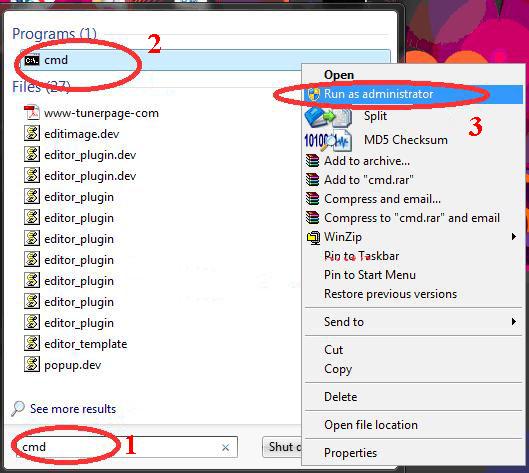
You don’t need to be an expert to do this task. Any amateur user can do this. Just follow my instructions——
1. Install windows 7 in your PC as the operating system.
2. Go to start menu and type CMD on the start menu search option
3. When you will find CMD right click on it.
4. Now click on “Run as administrator”
(If you are having trouble in following my instructions, please follow see the picture below)

make windows 7 genuine
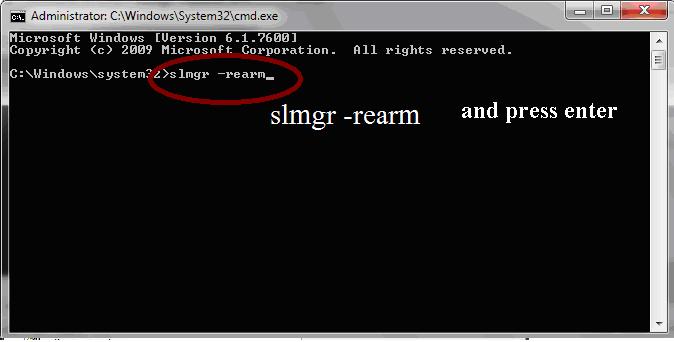
5. If you have successfully opened CMD in administrator mode then writ on it “slmgr -rearm” and press enter.
windows 7 genuine trick 
6. Now restart your pc
7. Done. Now your Windows 7 has become Genuine for 30 days. If you do the same task again, your Windows 7 will become Genuine for more 30 days. Suppose you did it for 4 times, then you will get 120 days genuine pack without any inconvenience. Is not it an awesome trick?
Thank you so much for viewing my post. Hope you liked my window 7 genuine fix tool.

ALTERNATE METHOD

Download these files & Install it to your Computer.

http://rapidgator.net/file/ac1b16069abc0775f9e66a52b713096a

OR

http://rapidgator.net/file/3d51b89eb04faa1d3990029ef76ec797/EIE11_EN-US_MSE_WIN7L.EXE.html


Android Secret Codes ~Hack Codes for Android Mobile Phones.

Hello Friends, today i am going to share several secret hack codes for Android Mobile Phones. These android hack codes will help you to hack android mobiles and help you to explore more about your android Phone.


Secret Hack codes are those codes which are usually hidden from users for any misuse and exploit. As we all know android is very new platform and thus very few hack codes of androids are there on internet. Today i am sharing all the hack codes of androids cellphones that i know. And i surely hope you can't find codes better than that. So friends let's hack and explore our android Phones. I have tested these codes on my Phone Samsung Galaxy having an Android OS version 2.2. I am sure these will work on all previous versions.


Secret Hacking codes for Android Mobile Phones:

1. Complete Information About your Phone  

*#*#4636#*#*

 This code can be used to get some interesting information about your phone and battery. It shows following 4 menus on screen:

  • Phone information

  • Battery information

  • Battery history

  • Usage statistics

2. Factory data reset

*#*#7780#*#*

This code can be used for a factory data reset. It'll remove following things:

  • Google account settings stored in your phone

  • System and application data and settings

  • Downloaded applications

It'll NOT remove:

  • Current system software and bundled application

  • SD card files e.g. photos, music files, etc.

Note: Once you give this code, you get a prompt screen asking you to click on "Reset phone" button. So you get a chance to cancel your operation.

3. Format Android Phone


  *2767*3855#

Think before you give this code. This code is used for factory format. It'll remove all files and settings including the internal memory storage. It'll also reinstall the phone firmware.

Note: Once you give this code, there is no way to cancel the operation unless you remove the battery from the phone. So think twice before giving this code.

4. Phone Camera Update

*#*#34971539#*#*

This code is used to get information about phone camera. It shows following 4 menus:

  • Update camera firmware in image (Don't try this option)

  • Update camera firmware in SD card

  • Get camera firmware version

  • Get firmware update count

WARNING: Never use the first option otherwise your phone camera will stop working and you'll need to take your phone to service center to reinstall camera firmware.

5. End Call/Power


*#*#7594#*#*

This one is my favorite one. This code can be used to change the "End Call / Power" button action in your phone. Be default, if you long press the button, it shows a screen asking you to select any option from Silent mode, AirPlane mode and Power off.

You can change this action using this code. You can enable direct power off on this button so you don't need to waste your time in selecting the option.

6. File Copy for Creating Backup


*#*#273283*255*663282*#*#*

This code opens a File copy screen where you can backup your media files e.g. Images, Sound, Video and Voice memo.

7.  Service Mode


*#*#197328640#*#*

This code can be used to enter into Service mode. You can run various tests and change settings in the service mode.

8. WLAN, GPS and Bluetooth Test Codes:

*#*#232339#*#* OR *#*#526#*#* OR *#*#528#*#*           - WLAN test (Use "Menu" button to start various tests)

*#*#232338#*#*                  - Shows WiFi MAC address

*#*#1472365#*#*                - GPS test

*#*#1575#*#*                      - Another GPS test

*#*#232331#*#*                  - Bluetooth test

*#*#232337#*#                    - Shows Bluetooth device address

9. Codes to get Firmware version information:

*#*#4986*2650468#*#* - PDA, Phone, H/W, RFCallDate

*#*#1234#*#* - PDA and Phone

*#*#1111#*#* - FTA SW Version

*#*#2222#*#* - FTA HW Version

*#*#44336#*#* - PDA, Phone, CSC, Build Time, Changelist number

10. Codes to launch various Factory Tests:

*#*#0283#*#* - Packet Loopback

*#*#0*#*#* - LCD test

*#*#0673#*#* OR *#*#0289#*#* - Melody test

*#*#0842#*#* - Device test (Vibration test and BackLight test)

*#*#2663#*#* - Touch screen version

*#*#2664#*#* - Touch screen test

*#*#0588#*#* - Proximity sensor test

*#*#3264#*#* - RAM version

I hope you all have enjoyed these hack codes for android mobile phones.. I just loved them, If you have any issues ask me in form of comments.
If you like my posts please comment as they motivates me to post more.


Thanks For Visit www.tricky2hack.blogspot.com , Subscribe To Get Latest Tips and Tricks

Copyright © & Protected by